

Claim a slot from a shared link
Your coordinator shares a link to the week's roster, usually in the mosque WhatsApp group. You don't need an app or an account. This takes about a minute.
Claim your first slot
Tap the link. The roster opens straight away, no sign-in. You see the date at the top and every slot underneath, each with its time, who it's for, and whether it's open, reserved or already filled.
Tap the slot you want, for example Car park marshal, 12:30pm. A panel slides up from the bottom asking Claim this slot? A slot someone else has already taken isn't tappable. Reserved roles are offered by the coordinator and cannot be claimed from the public list. An unanswered offer never publishes a name.

Tap Continue with my phone, then enter your name and UK mobile number and tap Text me a code.
Enter the 6-digit code we text you. It expires in about 5 minutes, and most phones fill it in for you from the text. The button stays greyed out until all six digits are in, so you can't send a half-typed code.
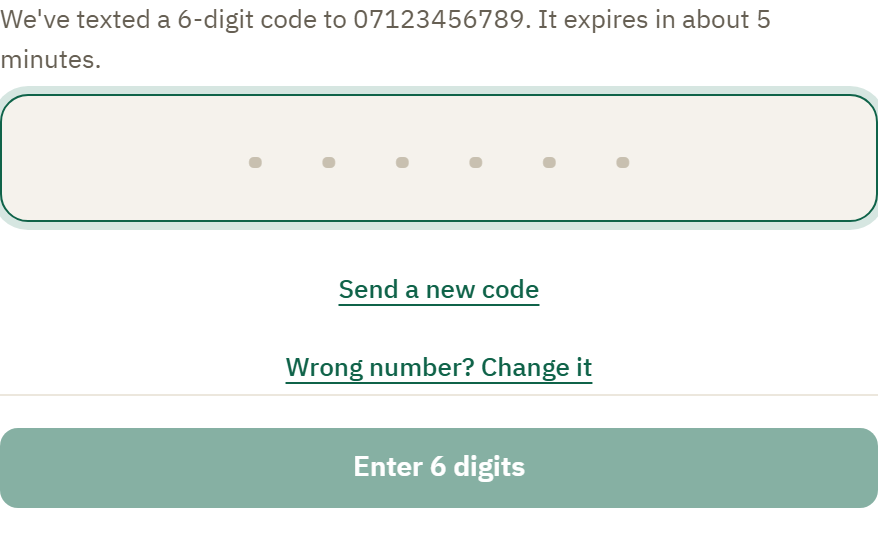
Done. The panel says You're on, and we text you a reminder the day before. Close it and the slot is yours on the roster.
Some slots are set aside for brothers or sisters. When you claim one, the panel asks which section you're claiming for.
Without JavaScript, an open slot takes you to a full-page claim form instead of a panel. Enter your details and code there, then use Back to the rota. Sending a new code uses the same checks. If you change the number, enter the details again; they are not carried in the native page's address.
You can close the panel at any point without claiming: tap the ✕, tap outside it, press Escape, or flick it down.
Respond to a duty invitation
A coordinator can send you a personal invitation link for a reserved role. Use the mobile number your mosque knows you by, then enter the verification code. If this device already recognises you, your invitation opens without another code.
Verification does not accept the duty. Review the role, time and requirements, then choose Accept this duty or Decline this duty. Declining never asks for a reason. If the time overlaps another accepted duty at this mosque, review the warning before confirming. Unknown end times are shown as unknown, not a promise that you are free.
Some service invitations include a Duty brief and Meeting point prepared for your work. This does not open the booking record or staff list. A declined or withdrawn invitation no longer shows its duty details.
The page confirms your response. If the invitation has changed, review the current details before trying again. If it will not open, check your number or ask your coordinator.
Step back from a private duty
Open the private duty invitation you accepted and choose Step back. Check the role and time, tick the confirmation, then choose Step back again. Choose Keep my duty to cancel without changing anything. You do not need to give a reason.
The invitation then says you no longer hold the duty. Your coordinator can offer the place to someone else; other workers keep their places. If you subscribe to your duty calendar, its cancellation appears when your calendar app next refreshes the feed.
Come back next week in two taps
The same phone remembers you. Open the link, tap the slot, then confirm as yourself. No number to re-enter, and no code.
Your own slot
Tap your own slot on the roster and its panel holds everything to do with it: who else is on, dropping it if you can't make it, adding your duties to your calendar, and your own details.
Fix a problem while you claim
The flow tells you what happened, in place, so you're never left tapping a dead button:
- Typed the wrong number? The form keeps what you typed so you just fix it. Nothing is texted to a number that isn't a UK mobile.
- Wrong or expired code? You see a clear message and tap Send a new code.
- Too many attempts? Pause before trying again. Other links or devices do not reset your number's code limit. If a code cannot arrive, ask your coordinator for help.
- Need to change your number? Tap Wrong number? Change it to go back to the phone step, already filled in.
- Role needs a DBS? Roles near children show DBS on the slot and say so before you start. If the mosque has no check on file for you, the panel explains what's needed and why. It does not offer a way around it: only a trustee recording a check they have seen can open that role to you. See Share your DBS status with a second mosque.
- Number registered to someone else? If you share a phone, Kadim says This number is registered to [name]. Tap That's me, continue if that's you under another spelling, or Use a different number to claim with your own. One number belongs to one volunteer.
- Link won't open? It may have expired or been copied incompletely. Ask your coordinator for a fresh link, then open that one.
Rather not be named to your crew?
Your slot shows your first name to the rest of the crew. If you would rather not appear, tap Don't show my name to the crew and your slot reads 1 more volunteer instead. Your coordinators still see who's coming, and you can turn your name back on the same way at any time.